
Schema Markup for Nursery Websites: A Guide to Local SEO
Discover how Schema markup can transform your nursery's search visibility. This guide covers how structured data helps local families find your setting and increases enquiry rates.
In a nutshell
Schema markup is a hidden code on your website that helps Google understand your nursery's details like opening hours, location, and Ofsted ratings. Implementing this structured data can significantly improve your click-through rates and local search rankings, making it easier for local parents to book a tour.
Understanding Schema Markup for Nursery Websites
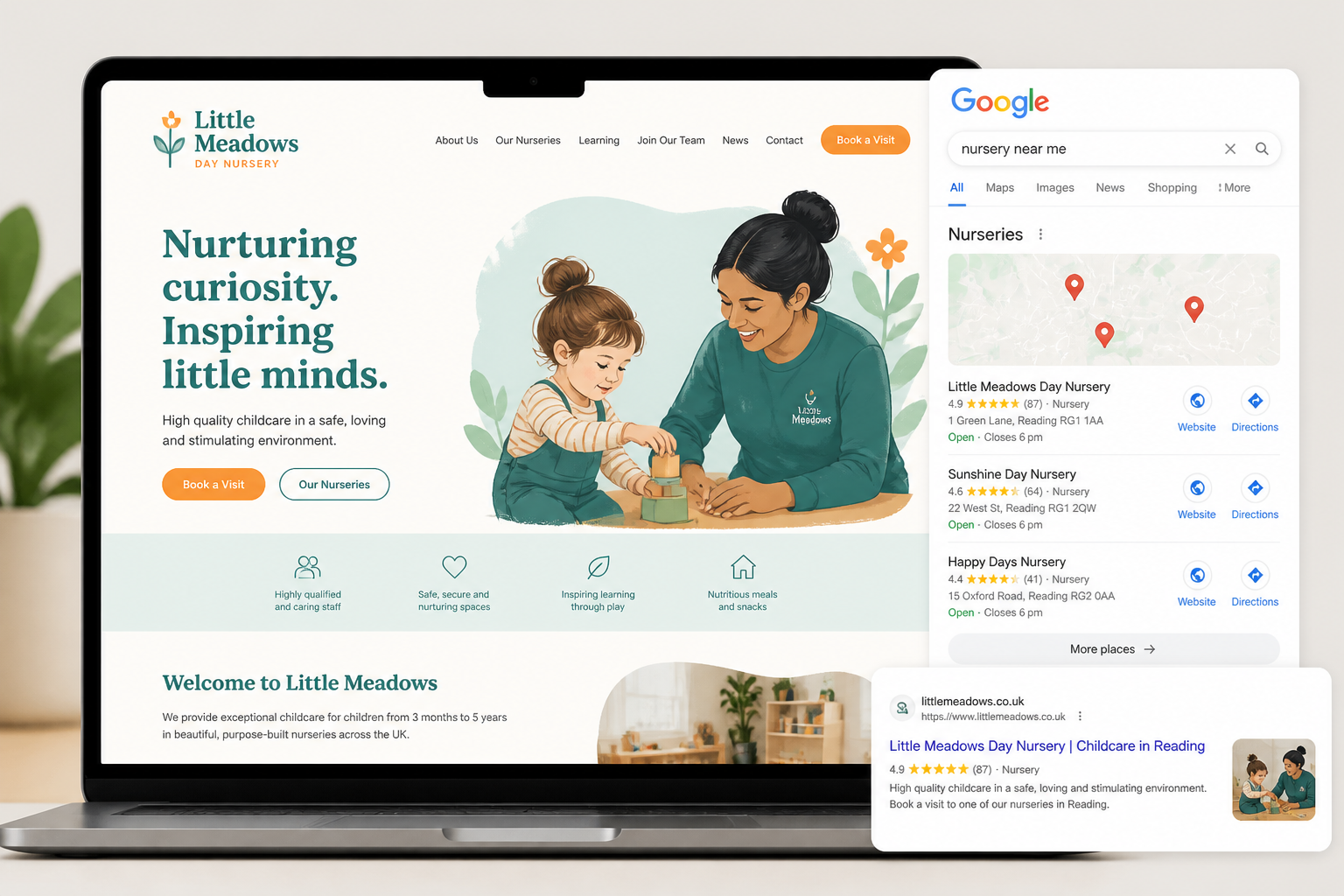
As a nursery owner, you are likely familiar with the competitive nature of local search. When a parent types "nursery near me" into Google, the search engine doesn't just look for keywords; it looks for structured information. This is where Schema markup for nursery websites becomes your secret weapon.
Think of Schema as a digital translator. While a human sees a beautiful photo of your messy play area, Google's bots see a string of pixels. Schema tells the bot: "This is a legal entity located at this address, offering childcare services for children aged 0 to 5."
By using structured data, you can increase your chances of appearing in the coveted 'Map Pack' and earning 'Rich Snippets.' These are the enhanced search results that show your star ratings, price range, or event dates directly on the Google results page.
The Benefits of Local SEO for Childcare Providers
For UK pre-schools and nurseries, local SEO is the most cost-effective way to fill vacant places. Most parents will only look for childcare within a three- to five-mile radius of their home or workplace. Schema helps anchor your business to your physical location.
Implementing technical SEO strategies allows you to compete with larger corporate chains. It ensures that when a parent searches for 30 hours funded childcare, your setting appears as a relevant, authoritative local option. Effective SEO for nurseries isn't just about traffic; it's about the right kind of local traffic.
- Increased Trust: Rich snippets that show your reviews build immediate credibility.
- Better Click-Through Rates (CTR): Results with structured data often see a 20-30% higher click rate.
- Voice Search Readiness: As more parents use Alexa or Siri to find "childcare near me," Schema provides the direct answers these devices require.
Essential Schema Types for UK Nurseries
Not all Schema is created equal. For a childcare setting, you should focus on a few specific types of structured data to maximise your impact on Google. The primary type you need is "LocalBusiness," or more specifically, "DayCare."
Within this code, you can define specific attributes that matter to UK parents. For example, you can list your specific Ofsted registration number and link to your latest report. This transparency is highly valued by both parents and search algorithms.
Consider these essential properties for your childcare websites:
- Address and Geo-coordinates: Ensures you appear correctly on Google Maps.
- Opening Hours: Crucial for parents checking if your 7:30 am start fits their commute.
- Price Range: While you might not list every fee, you can indicate your general pricing tier.
- Aggregate Rating: This pulls in your average score from Google Reviews.
Linking Your Ofsted Rating to Structured Data
In the UK, your Ofsted rating is your most valuable badge of honour. While Google doesn't have a specific "OfstedRating" field in the Schema.org vocabulary yet, you can use the "awards" or "knowsAbout" properties to highlight your status.
If you have an 'Outstanding' or 'Good' rating, you want that information to be as accessible as possible to search engines. You can also use the "Review" schema to highlight testimonials from parents who specifically mention the quality of your EYFS delivery.
Highlighting these credentials through structured data helps Google understand that you are a regulated, high-quality provider. This builds internal authority and supports your broader daycare marketing efforts.
Want this done for you?
Book a free Business Review Session and we'll map out exactly how to apply this to your setting.
Book my session →How to Implement Schema Without Being a Coder
The thought of editing website code can be daunting for many nursery managers. Fortunately, you don't need to be a developer to get the benefits of Schema. There are several tools available that can help you generate the necessary JSON-LD code.
If your website is built on WordPress, plugins like Yoast Local SEO or Rank Math can handle much of the heavy lifting. They provide simple forms where you type in your nursery name, address, and phone number, and the plugin generates the code automatically.
For those using other platforms, you can use Google's Structured Data Markup Helper. This tool allows you to visually tag elements on your website, and Google will then provide the code for you to copy and paste into your header.
Common Schema Mistakes to Avoid
While Schema is powerful, incorrect implementation can lead to penalties or, more commonly, Google simply ignoring your data. Accuracy is the highest priority when it comes to structured data.
One common mistake is a mismatch between your "NAP" data—Name, Address, and Phone number. If your Schema lists your phone number as 0113 123 4567, but your website footer shows a mobile number, Google may find the information unreliable.
- Don't Mark Up Hidden Content: Only provide Schema for information that is actually visible to users on the page.
- Avoid Over-optimisation: Don't use star ratings if you don't actually have reviews to back them up.
- Check Your Work: Use the Google Rich Results Test regularly to ensure your code is error-free.
Measuring the Impact on Your Enquiries
Once you have implemented Schema, you need to track how it affects your bottom line. Look at your Google Search Console data to see if your "Impressions" and "Clicks" have increased. Often, you will see a rise in the number of calls and direction requests coming from your Google Business Profile.
Better visibility directly correlates to higher occupancy rates. If you find your setting is still struggling to attract interest despite these technical fixes, you may need to look at your broader childcare business growth strategy. SEO is one piece of a larger puzzle that includes pricing, brand reputation, and staff quality.
By ensuring your technical foundations are solid, you give your nursery the best possible chance of being the first choice for local families. Schema markup isn't just a technical trend; it is a fundamental part of a modern nursery's marketing toolkit.
FAQs
What is the most important Schema for a nursery?
The LocalBusiness or DayCare Schema is the most vital. It identifies your nursery as a physical entity in a specific location, allowing Google to display your address, phone number, and opening hours accurately in local search results and maps.
Will Schema markup help if I have multiple nursery locations?
Absolutely. In fact, it is even more important for multi-site organisations. You should implement unique Schema markup for each individual branch page, ensuring each location's specific contact details and Ofsted reports are correctly linked to the right area.
Do I need to hire a developer to add Schema?
Not necessarily. While a specialist can ensure it is perfectly optimised, many modern CMS platforms and SEO plugins allow nursery owners to input their details into easy-to-use fields that generate the code automatically for you.
How long does it take to see results from Schema?
Google needs to re-crawl your site to see the changes. This can take anywhere from a few days to a couple of weeks. Once indexed, you may see an immediate change in how your listing appears in search, though ranking improvements happen over time.
Does Google use Schema for ranking nurseries?
While Schema is not a direct ranking factor on its own, it significantly improves how Google understands your site's content. This clarity helps Google match you with relevant searches, which indirectly boosts your local visibility and click-through rates.
Ready to take your nursery’s digital presence to the next level? Our team specialises in helping EYFS providers dominate their local area through expert strategy. To find out how we can help you grow your occupancy and streamline your marketing, book your free Business Review Session today.